On 21 October Rockwell Automation unveiled FactoryTalk Conductor, a platform meant to coordinate AI agents across engineering work from design to testing. It capped a year of launches that moved AI agents out of the chat window and into automation tools: PLC development environments, SCADA platforms and OPC UA servers. Most of those integrations speak the same protocol, the Model Context Protocol (MCP).
So the question for a plant is no longer whether an agent will get access to line data, but on what terms. Below is a summary of what changed, followed by a tested MCP server for a production line in Python. The agent reads selected tags and can only propose a setpoint. A person makes the change.
What 2026 brought
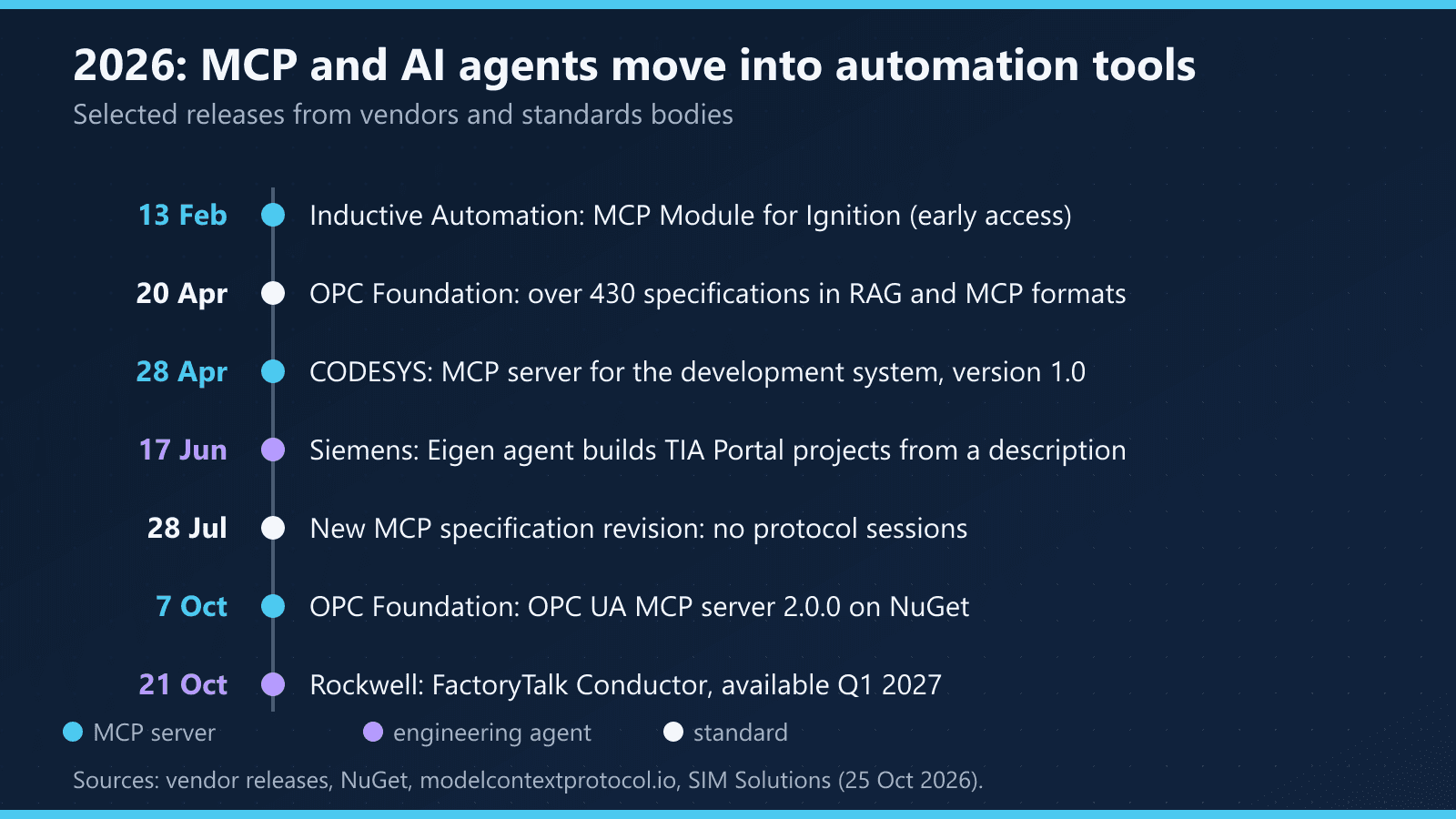
MCP servers in automation tools. Inductive Automation released an MCP Module for Ignition as early access on 13 February. Until Ignition 8.3.5 ships it needs a nightly build, access is governed by permissions and API tokens, and the vendor says plainly that the release comes without support. CODESYS shipped an MCP server for its development system: version 1.0 on 28 April and 1.1 on 22 July. According to its data sheet, the tools browse the project tree, read and replace Structured Text, return the device and I/O configuration and check for errors. The OPC Foundation published a stable 2.0.0 of its OPC UA MCP server on NuGet on 7 October, followed by 2.0.1 five days later. It exposes OPC UA Part 4 service calls as MCP tools, and you narrow the tool set with a profile such as --profile core.
Engineering agents. Siemens keeps extending its Eigen Engineering Agent. In June, at VivaTech in Paris, it added generation of PLC tags from ECAD files and creation of projects that follow the Siemens Automation Framework from a plain-language machine description. Siemens reports more than 100 customers in 19 countries and work two to five times faster than by hand. Those are vendor figures we have not checked. Rockwell plans FactoryTalk Conductor for the first quarter of 2027, starting with Studio 5000 Logix Designer, Logix Echo, Emulate3D and FactoryTalk Optix, and customers will be able to plug in their own language model, including one hosted locally.
Standards. On 20 April the OPC Foundation said it would convert more than 430 OPC UA companion specifications into formats suited to RAG and MCP. MCP itself got a new specification revision on 28 July: no more protocol sessions or initialize handshake, with every request carrying its protocol version and client capabilities.
For context, Rockwell's 2026 State of Smart Manufacturing Report, based on more than 1,500 manufacturers in 17 countries, puts the share of AI-supported operations at 34% today and above half by 2030. In the same survey, 46% of firms had at least one cyber incident.
Why "just connect the assistant to the PLC" is not enough
The MCP specification is blunt about it. There should always be a human in the loop with the ability to deny tool invocations. Clients must treat tool annotations such as readOnlyHint as untrusted unless they come from trusted servers. Servers must validate inputs, enforce access control, rate-limit calls and sanitise outputs, and clients should log tool use for audit.
Cybersecurity agencies go further. Joint guidance from CISA, Australia's ACSC and seven other bodies, published on 3 December 2025, says to limit active control of OT infrastructure by AI without a human in the loop. It also favours push-based or brokered architectures that move data out of OT without persistent inbound access, with one-way transfer and audited staging buffers where data crosses into business networks.
That gives three rules, and the example follows all of them:
- The agent sees a tag list, not the controller. The server rejects any name that is not on the list.
- A write is a proposal. The agent's tool queues a request. A separate program, run by an operator, writes to the PLC.
- The server enforces limits, not the model. Setpoint ranges and permissions live in server code, not in a tool description.
Where the MCP server belongs
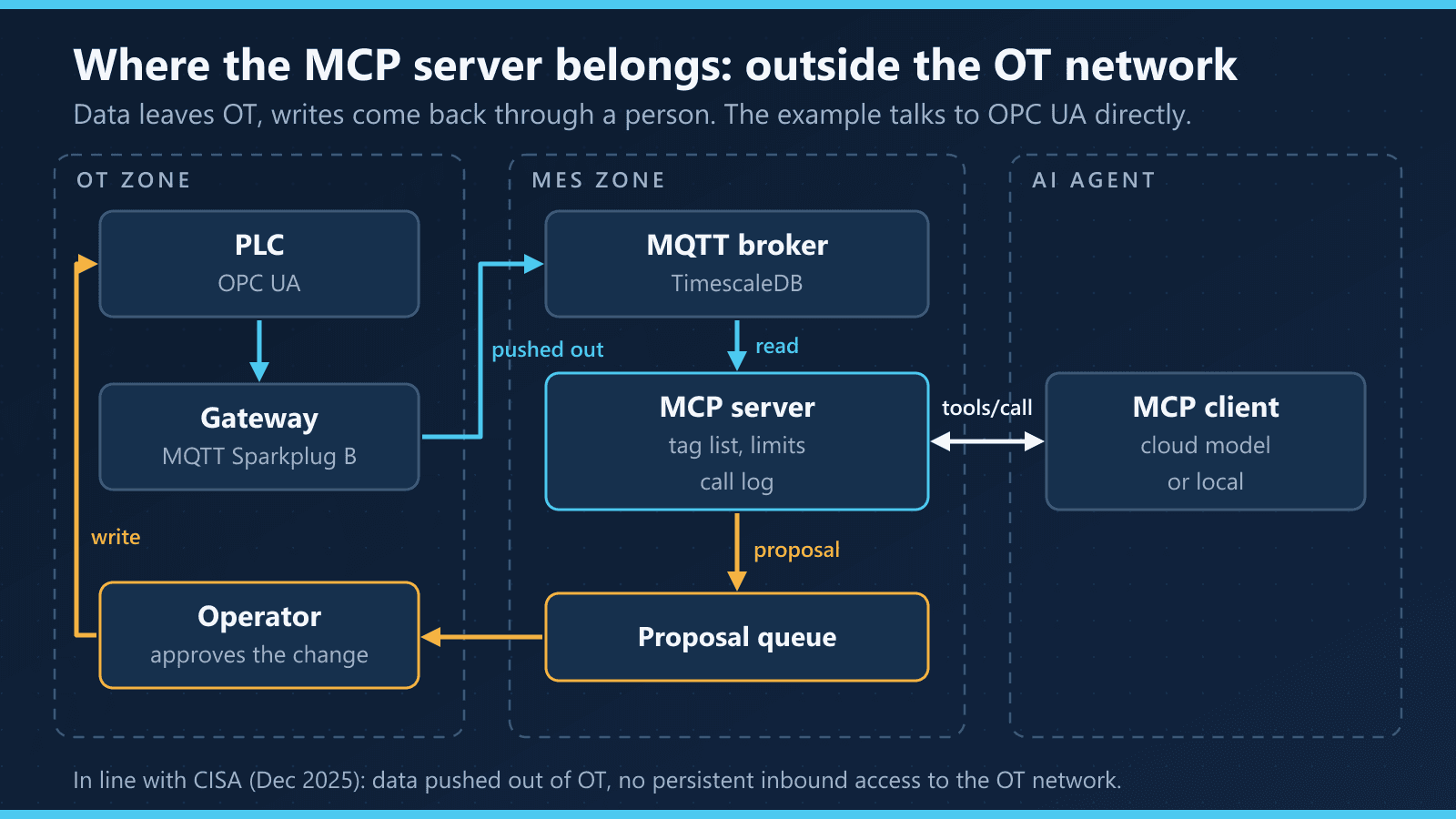
In production, the MCP server should not talk to the controller at all. Line data travels through a gateway and MQTT Sparkplug B to a broker and a time-series database outside the OT network, and the agent reads that copy. OmniMES is built this way: the system never connects to controllers, telemetry arrives over MQTT Sparkplug B and lands in TimescaleDB, and that is the data the MCP server uses. A setpoint change goes back into OT by one route only, through a person.
The example below connects to OPC UA directly because that is the quickest thing to run on a test bench. The rules stay the same; only the read source changes.
A line MCP server, step by step
We tested the code with mcp 2.3.0 and asyncua 2.1.0 on Python 3.11, against an OPC UA simulator with four process variables and 300 diagnostic registers.
pip install "mcp==2.3.0" "asyncua==2.1.0"
The server: read from a list, write as a proposal
"""MCP server for line 1: reads only allow-listed tags, writes only as proposals for a human."""
import sqlite3
import time
import uuid

from asyncua import Client as OpcClient
from mcp.server.mcpserver import MCPServer
from mcp.server.mcpserver.exceptions import ToolError
from mcp.types import ToolAnnotations

ENDPOINT = "opc.tcp://127.0.0.1:4840/line1/"
DB = "proposals.db"

# The agent sees these tags and nothing else in the controller's address space
READABLE = {
    "press1.state": "ns=2;s=Press1.State",
    "press1.count": "ns=2;s=Press1.Count",
    "press1.oil_temp": "ns=2;s=Press1.OilTemp",
    "press1.pressure_setpoint": "ns=2;s=Press1.PressureSetpoint",
}
# Setpoints the agent may propose, with hard limits checked on the server side
PROPOSABLE = {"press1.pressure_setpoint": (150.0, 200.0)}

mcp = MCPServer("line1")
_opc = None


async def opc():
    global _opc
    if _opc is None:
        _opc = OpcClient(ENDPOINT)
        await _opc.connect()
    return _opc


def db():
    con = sqlite3.connect(DB)
    con.execute(
        "create table if not exists proposals (id text primary key, tag text, value real, reason text,"
        " created real, status text, approved_by text, executed real, before real, after real)"
    )
    return con


@mcp.tool(annotations=ToolAnnotations(read_only_hint=True, open_world_hint=False))
async def read_tags(tags: list[str]) -> dict:
    """Read current values of line 1 tags.

    Allowed: press1.state, press1.count, press1.oil_temp, press1.pressure_setpoint.
    """
    unknown = sorted(set(tags) - READABLE.keys())
    if unknown:
        raise ToolError(f"Tags not allowed: {unknown}. Allowed: {sorted(READABLE)}")
    client = await opc()
    result = {}
    for tag in tags:
        dv = await client.get_node(READABLE[tag]).read_data_value()
        stamp = dv.SourceTimestamp or dv.ServerTimestamp
        result[tag] = {
            "value": dv.Value.Value,
            "status": dv.StatusCode.name,
            "time": stamp.isoformat() if stamp else None,
        }
    return result


@mcp.tool(annotations=ToolAnnotations(read_only_hint=False, destructive_hint=False, open_world_hint=False))
async def propose_setpoint(tag: str, value: float, reason: str) -> dict:
    """Queue a setpoint change for a human to approve. Nothing changes on the line until then."""
    if tag not in PROPOSABLE:
        raise ToolError(f"No proposals allowed for {tag}. Allowed: {sorted(PROPOSABLE)}")
    low, high = PROPOSABLE[tag]
    if not low <= value <= high:
        raise ToolError(f"{value} is outside the permitted range {low}-{high}")
    proposal_id = uuid.uuid4().hex[:8]
    with db() as con:
        con.execute(
            "insert into proposals (id, tag, value, reason, created, status) values (?, ?, ?, ?, ?, 'pending')",
            (proposal_id, tag, value, reason, time.time()),
        )
    return {"proposal_id": proposal_id, "status": "pending human approval"}


if __name__ == "__main__":
    mcp.run(transport="stdio")
read_tags carries read_only_hint=True and propose_setpoint does not, but a client is under no obligation to believe annotations. The real protection is READABLE and PROPOSABLE: the model cannot see a register outside the list, and it cannot propose a pressure of 260 because the server checks the range before anything is queued. The ns=2 namespace index comes from the simulator, so check it on a real controller before you hard-code node IDs.
Approval: the operator's program, not the agent's
"""Operator side: approve a proposal and write it to the PLC. The agent never runs this."""
import asyncio
import sys
import time

from asyncua import Client as OpcClient, ua

from line_mcp import ENDPOINT, PROPOSABLE, db

WRITABLE = {"press1.pressure_setpoint": "ns=2;s=Press1.PressureSetpoint"}


async def approve(proposal_id: str, operator: str):
    with db() as con:
        row = con.execute("select tag, value, status from proposals where id = ?", (proposal_id,)).fetchone()
    if row is None or row[2] != "pending":
        raise SystemExit(f"No pending proposal {proposal_id}")
    tag, value, _ = row
    low, high = PROPOSABLE[tag]
    if not low <= value <= high:  # check again: the database is not the PLC's safety layer
        raise SystemExit(f"{value} is outside {low}-{high}")
    async with OpcClient(ENDPOINT) as opc:
        node = opc.get_node(WRITABLE[tag])
        before = await node.read_value()
        await node.write_value(value, ua.VariantType.Double)
        after = await node.read_value()
    with db() as con:
        con.execute(
            "update proposals set status = 'executed', approved_by = ?, executed = ?, before = ?, after = ? where id = ?",
            (operator, time.time(), before, after, proposal_id),
        )
    print(f"{tag}: {before} -> {after}, approved by {operator}")


if __name__ == "__main__":
    asyncio.run(approve(sys.argv[1], sys.argv[2]))
The program checks the range a second time, because the proposal database is not a safety layer. It also records the value before and after the change and the name of the person who approved it. In a real plant this belongs in an HMI panel or an application with a login, not a console script.
Testing without a language model
The SDK's client connects to the server in the same process, so you can exercise the whole thing without a model:
import asyncio

from mcp import Client

import line_mcp


async def main():
    async with Client(line_mcp.mcp) as client:
        result = await client.call_tool("read_tags", {"tags": ["press1.oil_temp"]})
        print(result.is_error, result.content[0].text)


asyncio.run(main())
What our run returned:
| Call | Result |
|---|---|
read_tags for three listed tags | values with status Good and a timestamp |
read_tags for Diagnostics.Reg007 | error: tag not allowed, with the list of allowed names |
propose_setpoint with 260 | error: outside the 150–200 range |
propose_setpoint with 172.5 | proposal queued, PLC setpoint unchanged |
approve.py with an operator name | setpoint 180.0 → 172.5, recorded in the proposal database |
With a real client, start the server with python line_mcp.py; it talks over standard input and output. The test simulator is an asyncua OPC UA server with a Press1 object (State, Count, OilTemp and a writable PressureSetpoint) and 300 registers under a Diagnostics object.
Two traps in SDK 2.x
FastMCP is gone. In version 2 the class is MCPServer, imported from mcp.server.mcpserver. Importing from mcp.server.fastmcp raises an error that points to the migration guide, so many examples online need updating.
A plain exception hides the error text. If a tool raises ValueError, the model sees only "Error executing tool read_tags" and never learns which tags are allowed. The message reaches the model only when the tool raises ToolError. We tried both: with ToolError the agent gets the list of allowed names and can correct its own call. In SDK results the error field is is_error.
How much data reaches the model
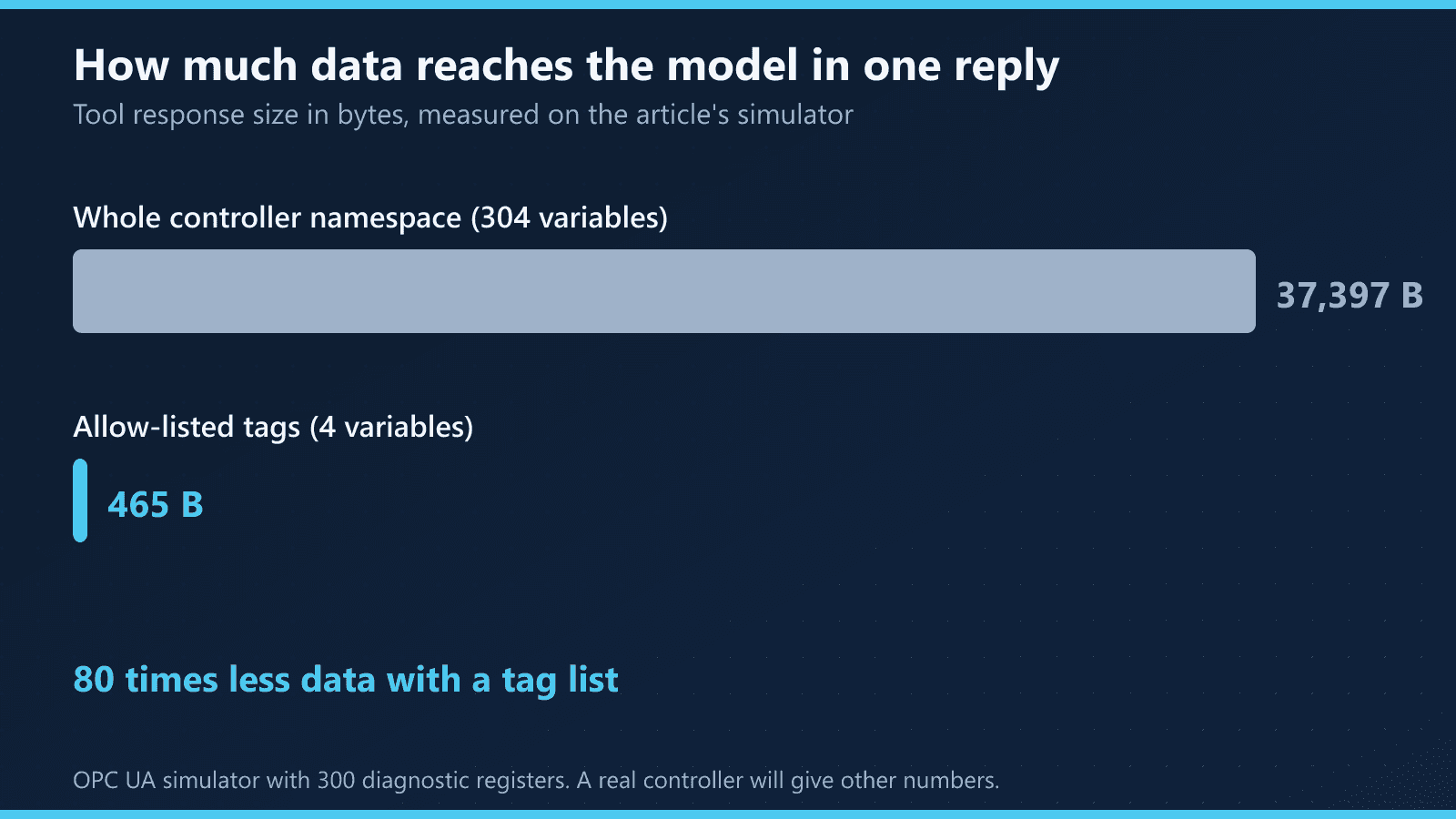
A "show me every tag" tool is tempting because it works straight away. On our simulator a dump of the controller's whole namespace, 304 variables, came to 37,397 bytes; reading the four listed tags took 465 bytes, about 80 times less. Every one of those bytes lands in the model's context, costs money and dilutes its attention. A real controller has a different number of variables, so the ratio will differ, but the direction holds.
How much freedom to give the agent
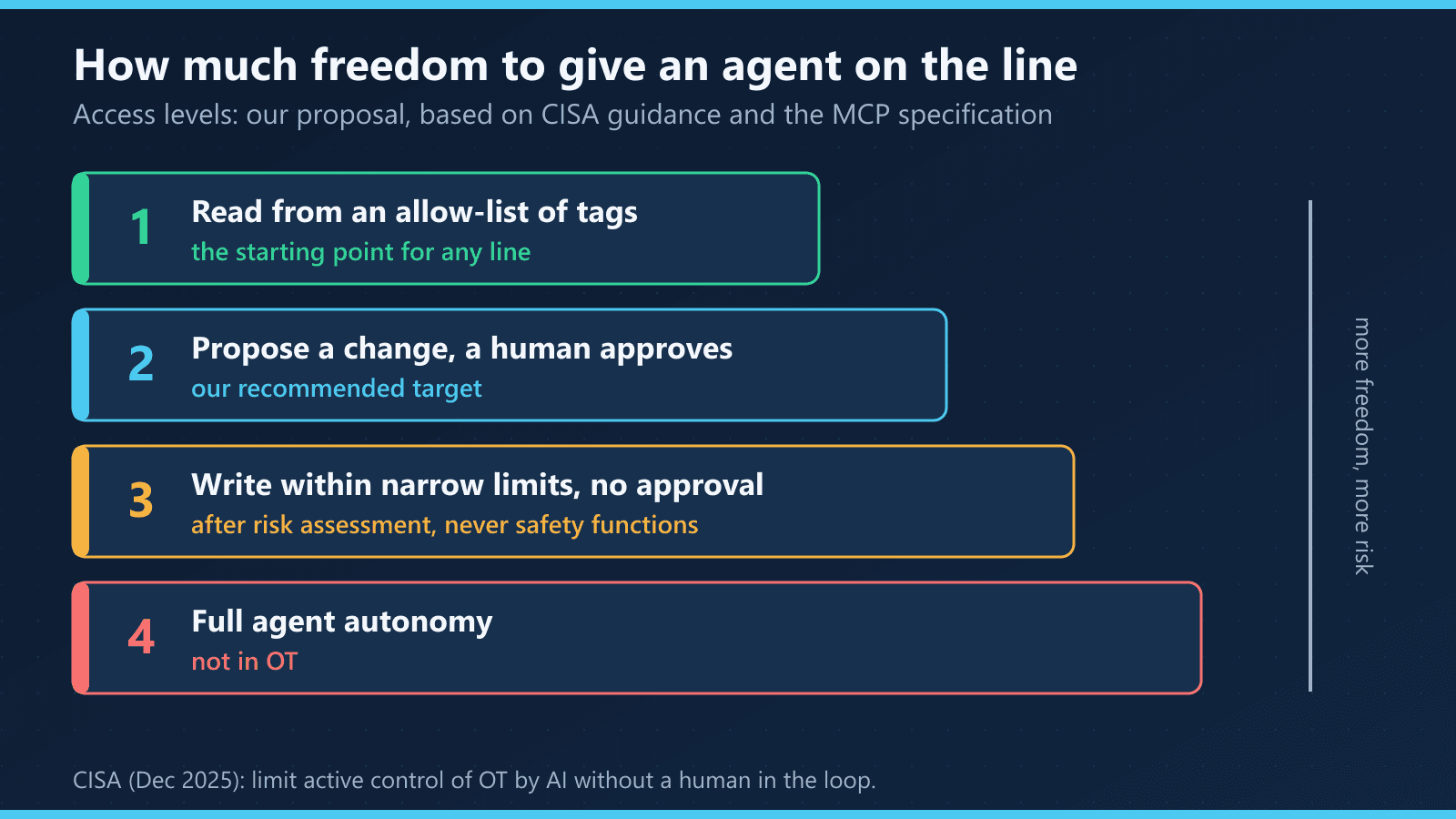
We suggest four levels. Reading from a tag list is where every line should start. Proposals approved by a person are a sensible target for most uses. Writing within narrow limits without approval only makes sense after a risk assessment, and never for safety functions. We do not recommend full autonomy in OT. This is our proposal rather than a standard, drawn from the CISA guidance and MCP specification cited above.
Barriers and limits
- Tool maturity. The Ignition MCP Module is early access with no support. The CODESYS MCP server does not include technical support and can run in only one development environment at a time. FactoryTalk Conductor will not be available until 2027.
- Vendor claims. The two-to-five-times speed-up for the Eigen Engineering Agent is Siemens' figure. Measure it on your own projects before you decide.
- Connection security. The example uses OPC UA without encryption. A plant needs SignAndEncrypt with certificates, a dedicated account for the MCP server and read-only rights on the OPC UA server side.
- Data as model input. A tag value, an alarm text or an operator comment all reach the model as text. The MCP specification says to validate tool results before passing them to the model.
- What the example leaves out. It has no rate limiting and no log of reads, and the specification requires rate limiting. It does not reconnect a dropped OPC UA session either. SQLite as a queue and a script as the operator panel are fine for a test, not for shift work.
What to do this week
- List the tags your first use case needs. It is usually a dozen or two, not hundreds.
- Decide on the read source: a historian, broker or database outside the OT network, not the controller.
- Describe every setpoint the agent might propose: its range and who approves a change.
- Run the example on the simulator and look at what the model receives when a call is wrong.
- Log tool calls from day one, before the agent reaches anyone in production.
MCP in OmniMES
OmniMES has had a built-in MCP server since version 4.3.0. An AI assistant connects to it with a token and can configure machines and build dashboards, while raw machine telemetry stays read-only. We showed how that works in MCP in OmniMES in practice, and the data source the agent reads from is covered in Unified Namespace in practice.
Sources
- Rockwell Automation, Rockwell Automation Introduces FactoryTalk Conductor, an AI-Native Orchestration Platform for Industrial Automation, PR Newswire, 21 Oct 2026 — https://www.manilatimes.net/2026/10/21/tmt-newswire/pr-newswire/rockwell-automation-introduces-factorytalk-conductor-an-ai-native-orchestration-platform-for-industrial-automation/2450721
- Siemens, Siemens takes AI for the physical world to the next level with two new Eigen Engineering Agent capabilities, 17 June 2026 — https://press.siemens.com/global/en/pressrelease/siemens-takes-ai-physical-world-next-level-two-new-eigen-engineering-agent
- CODESYS, CODESYS Development System MCP Server data sheet — https://us.store.codesys.com/media/n98_media_assets/files/2101000023/2/CODESYS%20Development%20System%20MCP%20Server_en.pdf
- SIM Solutions, AI in OT update, Q4 2026: PLC and SCADA news that matters, 25 Oct 2026 — https://simsolutions.be/insights/ai-in-ot-update-2026-q4/
- NuGet, OPCFoundation.NetStandard.Opc.Ua.Mcp package — https://www.nuget.org/packages/OPCFoundation.NetStandard.Opc.Ua.Mcp
- OPC Foundation, OPC Foundation Advances OPC UA for the AI Era with Companion Specifications Optimized for Agentic AI, 20 April 2026 — https://opcfoundation.org/news/press-releases/opc-foundation-advances-opc-ua-for-the-ai-era-with-companion-specifications-optimized-for-agentic-ai/
- Inductive Automation, MCP Module Early Access, forum, 13 Feb 2026 — https://forum.inductiveautomation.com/t/mcp-module-early-access/113966
- Model Context Protocol, Key Changes, revision 2026-07-28 — https://modelcontextprotocol.io/specification/2026-07-28/changelog
- Model Context Protocol, Tools, revision 2026-07-28 — https://modelcontextprotocol.io/specification/2026-07-28/server/tools
- MCP Python SDK, migration guide to v2 — https://py.sdk.modelcontextprotocol.io/v2/migration/
- CISA et al., Principles for the Secure Integration of Artificial Intelligence in Operational Technology, 3 Dec 2025 — https://www.cisa.gov/resources-tools/resources/principles-secure-integration-artificial-intelligence-operational-technology
- Process Online, Rockwell Automation releases 2026 State of Smart Manufacturing Report, 20 May 2026 — https://www.processonline.com.au/content/business/news/rockwell-automation-releases-2026-state-of-smart-manufacturing-report-1482753481