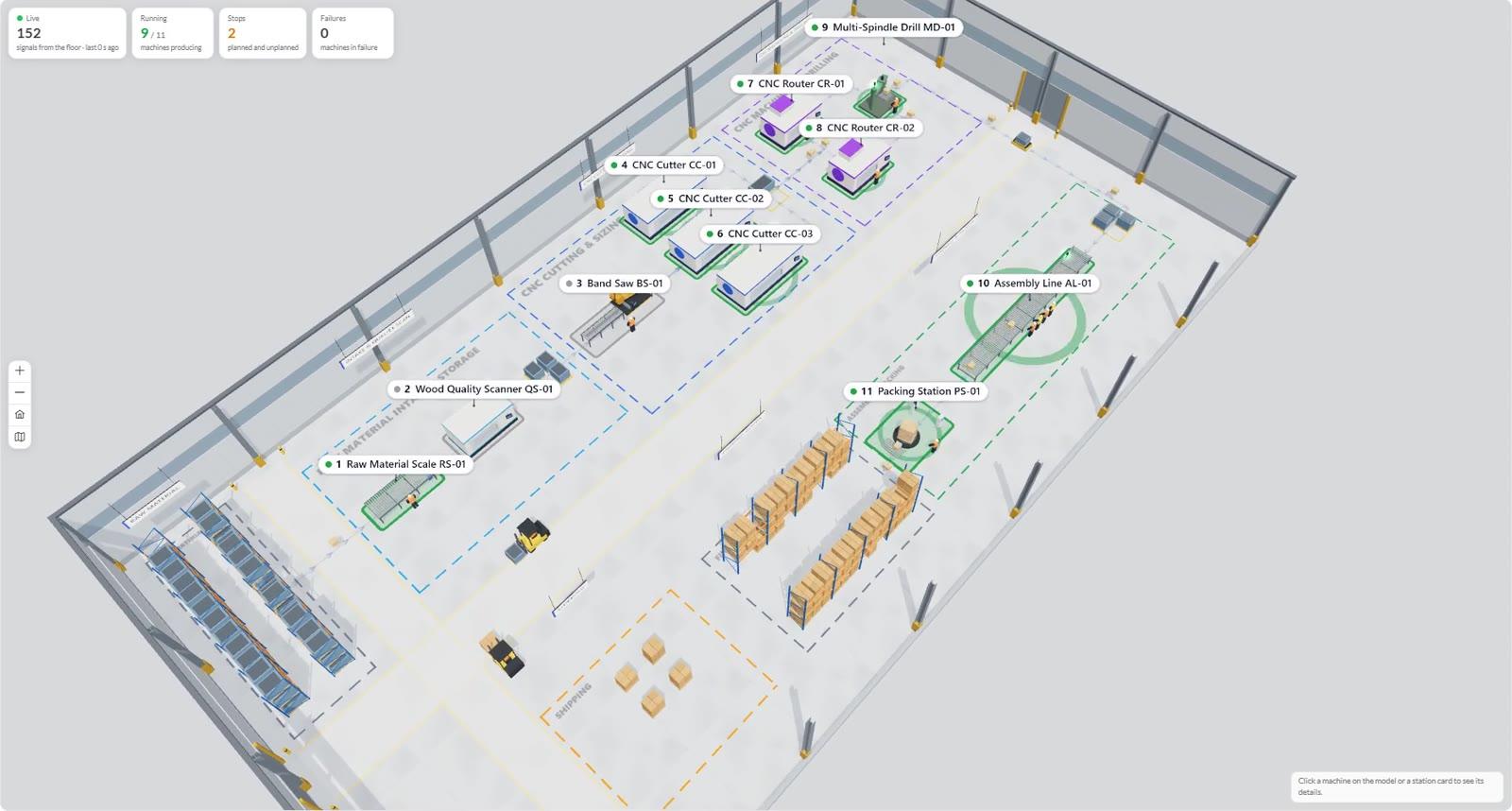
A planogram is flat, Monitoring is a wall of tiles, and the shop floor… the shop floor has three dimensions. As of version 4.6.0, OmniMES has a new screen — Hologram: a 3D model of your hall where machines glow in the colour of their state, forklifts drive down the aisles and parts travel from station to station. No VR headset, no 3D designer and no weeks of modelling.
What you see in Hologram
- The live state of every machine — a stack light on the machine, a floor outline in the status colour and a plate with the station number. Green: running. Amber: stopped. Red: failure. You can tell where to walk from the far end of the hall.
- Station cards in process order — with current readings: energy, power, temperatures, part counts. Click a card and the camera flies to the machine and opens a panel with every reading.
- Counters at the top — how many machines are running, how many are stopped, how many are down, and how many signals have just arrived from the floor.
- Top view and full screen — great for a TV on the shop floor or the morning stand-up. Station cards can sit on the side, at the bottom, or be hidden when only the model matters.
Simulation, a.k.a. “what if…?”
Switch the same model to simulation mode and watch material flow through the lines. OmniMES calculates throughput and finished parts, and points straight at the bottleneck. Shorten a cycle at one station or add buffer space — and see right away whether it actually helps, or whether the queue has just moved one machine down the line. A whole 8-hour shift is calculated in one click. Experiments cost nothing and stop no lines.
Who builds the model? An AI assistant
Nobody has to spend weeks in a CAD tool. The hall model is built by an AI assistant (Claude Opus 5.5 and newer models give the best results) through the OmniMES MCP server, from the machine parks, lines and machines already in the system:
- In Hologram settings you pick the scope: a whole machine park, selected lines or just a few machines.
- The wizard assembles a ready prompt with the right identifiers — you copy it into your assistant.
- The assistant lays out the hall: machines at real-world sizes, racks, aisles, forklifts, cranes and material flows. After every save, OmniMES checks the model (are all machines there, does anything overlap, is every machine part of the flow) and tells the assistant what to fix.
- Every change is a new version with a note — going back to an earlier one takes a single click. When new machines arrive, the model is extended rather than redrawn.
For the record, the WOODCRAFT wooden furniture plant in the videos was built exactly this way. The assistant received a list of 11 machines on 4 lines and returned an 80 × 44 m hall with a raw material store, aisles, two forklifts, an AGV and a U-shaped flow from intake to shipping. Quality check: no remarks.
Where to see it
Hologram is live on the OmniMES demo — in the menu under Preview → Hologram. Step-by-step instructions are in the Hologram chapter of the documentation, and the full list of changes in version 4.6.0 is in the changelog.
Disclaimer: The “WOODCRAFT” and “Stalownia” plants shown in the videos are fictional — OmniMES demo data. Any resemblance to existing entities is coincidental.