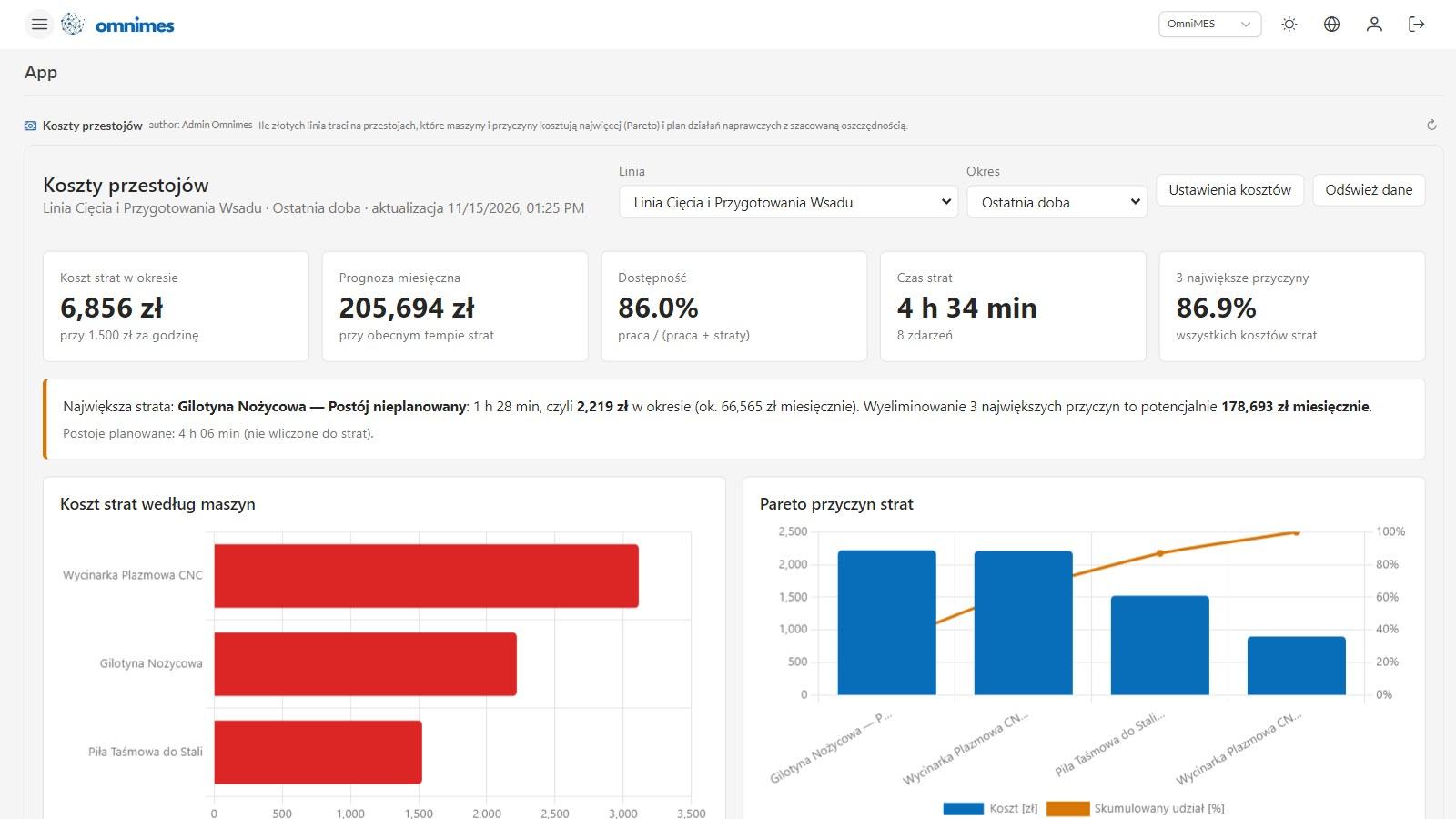
As of today, OmniMES 4.9.0 has a new tab: App Studio, labelled Beta for now. You tell Claude what you need, for example "how much money is the cutting line losing to downtime, and which causes should we tackle first?", and Claude builds an interactive app for it: KPI tiles, charts, tables, notes and forms. The app runs on live OmniMES data: machines, signals, events, measurements, BI data and production orders. Once it is ready, you add it to the side menu in a section of your own and share it with selected groups or individual people.
Below we explain why we built it, what building an app looks like, what two apps built during testing showed, and the security rules behind it all. We finish with a comparison of apps and BI dashboards and a short guide to getting started.
Every plant has questions no vendor anticipated
An MES is built around what plants have in common: machine states, OEE, orders, shift reports. Yet the questions a production manager asks every day are often specific to one plant:
- what does an hour of downtime on this particular shear cost us, at our own rate?
- which order is going to miss its deadline, and how many pieces per hour would it take to make it?
- what does the next shift need to know so it does not start by hunting for information?
Until now there were three ways to get an answer. The first is to ask the system vendor and wait for a release. That takes weeks or months, and a feature that only one plant needs often never makes the roadmap. The second is an export to a spreadsheet that is out of date within a week and understood by one person. The third is a BI dashboard. It shows the numbers, but building one takes SQL, and a dashboard has no place to record a decision or assign an action.
App Studio changes who builds these tools. The people who know the problem do it: the production manager, maintenance, quality. Each tool stays small: one app answers one question with a few screens, not dozens. Governance stays with IT: permissions, an audit log and version history.
How it works: from a description to a menu entry
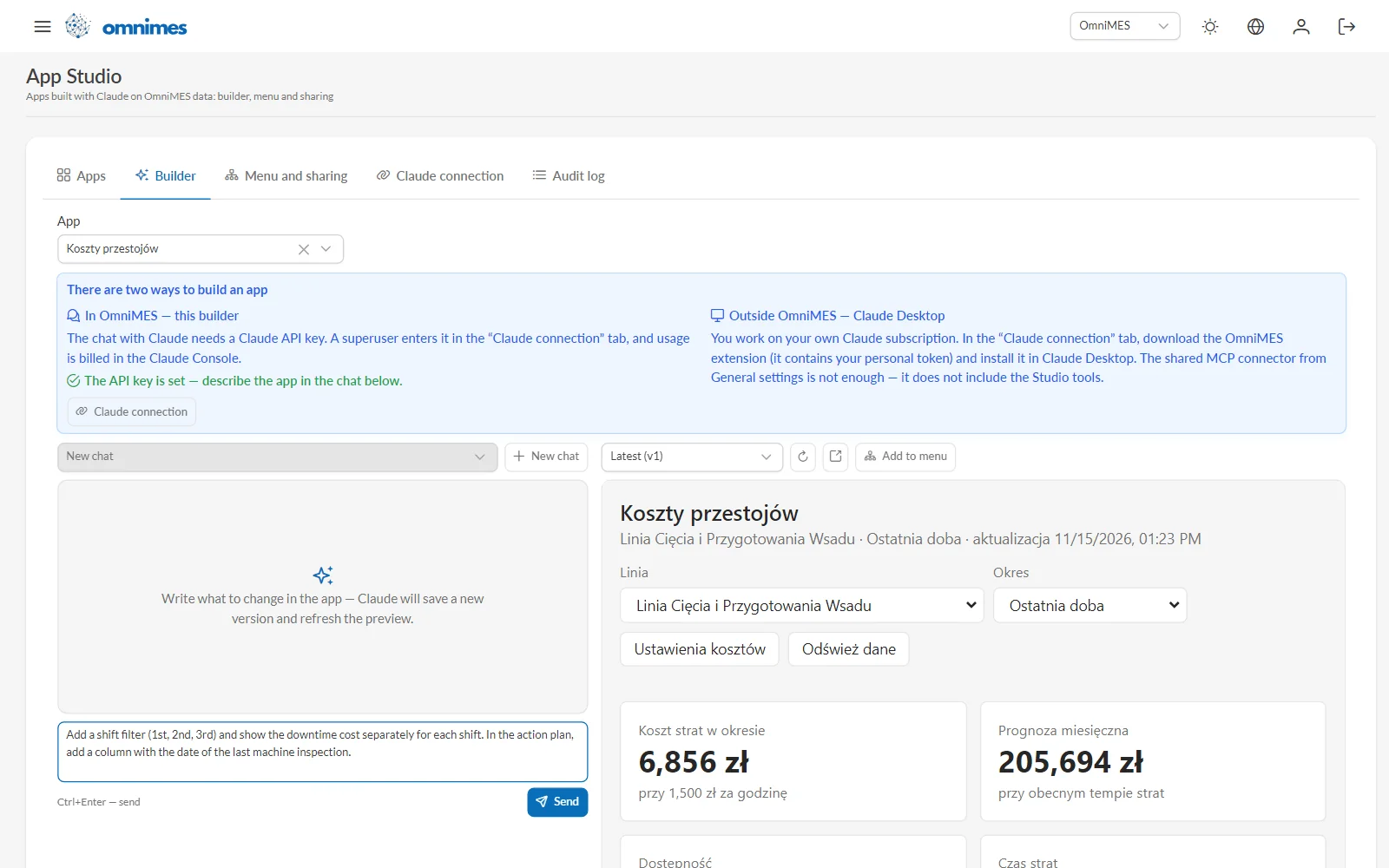
- Describe it in the builder. In App Studio → Builder, write in plain language what you need. A good description says which data matter, who will use the app and which decision it should support.
- Claude reads the data and builds the app. Claude looks at the plant structure, signals, events and orders, with the permissions of the person in the conversation. Then it writes the app and saves it in OmniMES.
- Live preview. The right-hand side of the builder runs the app on real data straight away. You ask for changes in the next message, for example "add a shift filter and show the downtime cost separately for each shift".
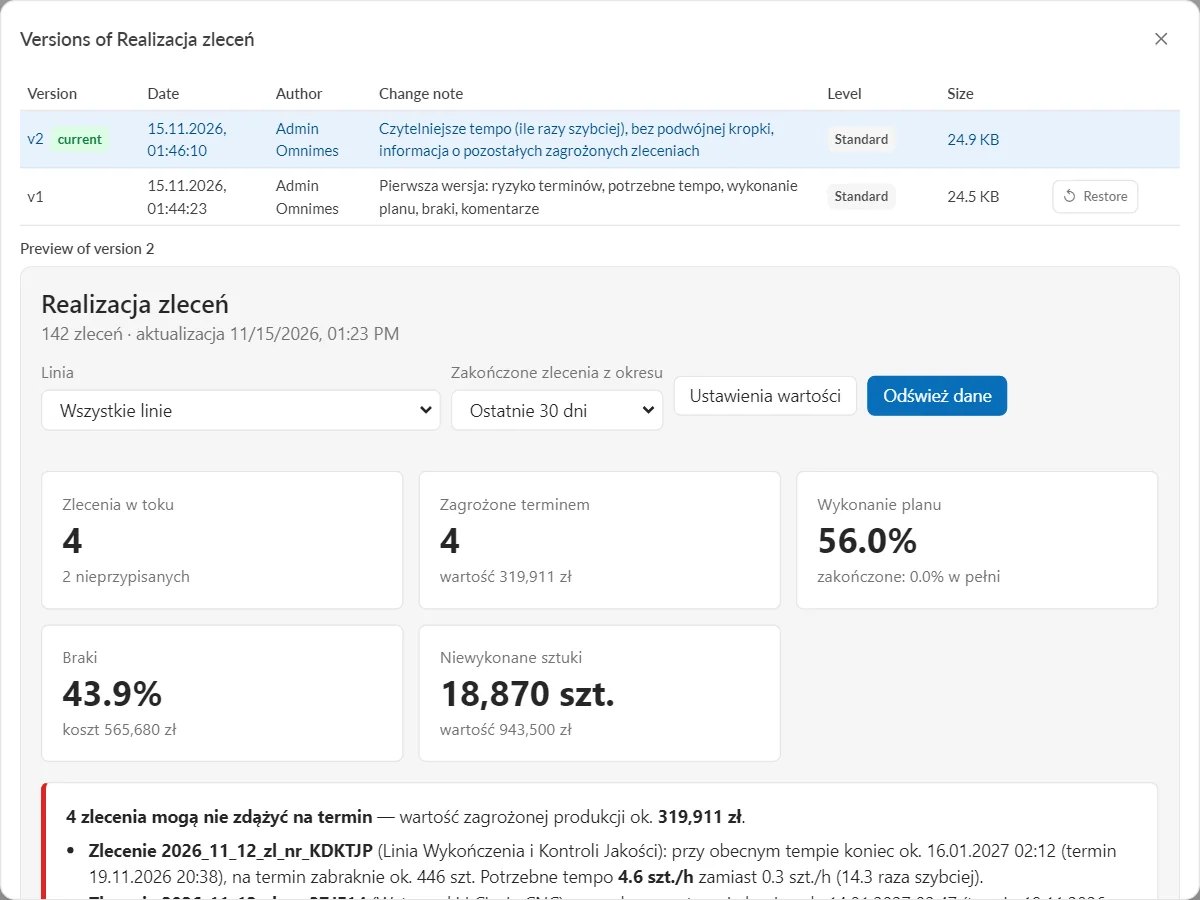
- Versions. Every save creates a new version with a change note and an author. You can preview any earlier version and restore it with one click.
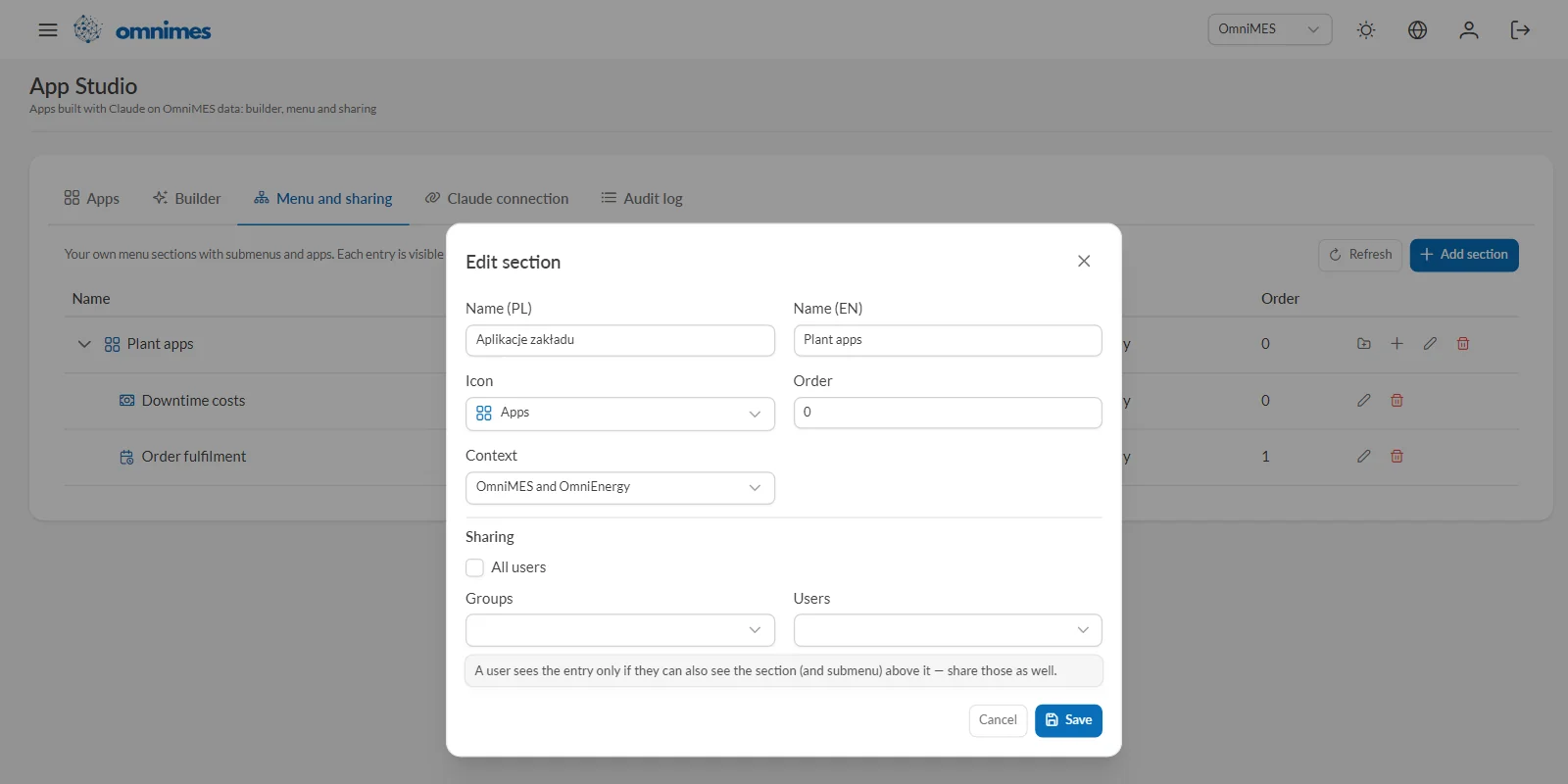
- Menu and sharing. In the Menu and sharing tab you create your own side-menu sections, such as "Plant apps", and decide who sees them: everyone, selected groups or specific people.
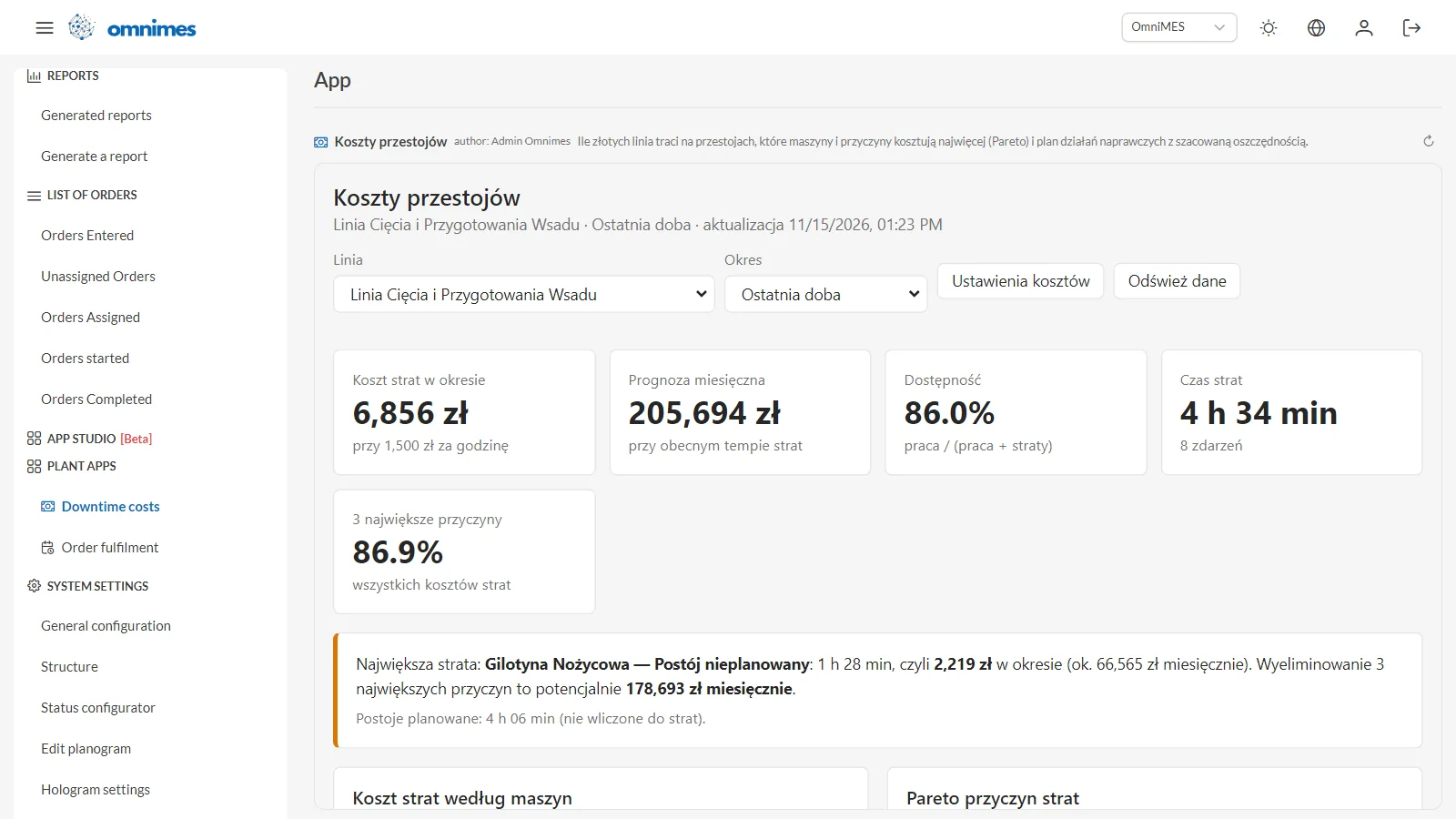
For the people using it, an app is just another OmniMES screen. They click the menu entry and get to work.
Two ways to work with Claude
You can build an app in two ways:
- In OmniMES, in the builder. The chat with Claude needs a Claude API key from the Claude Console. A superuser enters it in the Claude connection tab, and usage is billed in the Claude Console. Claude Max, Ultra and Team plans include monthly API credits: USD 100 on Max, USD 200 on Ultra and up to USD 500 in a pooled balance on Team (Anthropic, 2026). A key from the Console organization linked to such a plan works in App Studio like any other API key.
- In Claude Desktop, on your own Claude subscription. In the Claude connection tab each user downloads the OmniMES extension with a personal token and installs it in Claude Desktop. Claude can then create and save apps, and the apps also render right inside the Claude conversation.
Example 1: Downtime costs
Both apps below were built with Claude while we were testing App Studio. They run on our demo instance, which is fed by a signal simulator, so the numbers show what the app does, not the results of a real plant. The apps were described in Polish, so their labels are in Polish too; the OmniMES interface around them is in English.
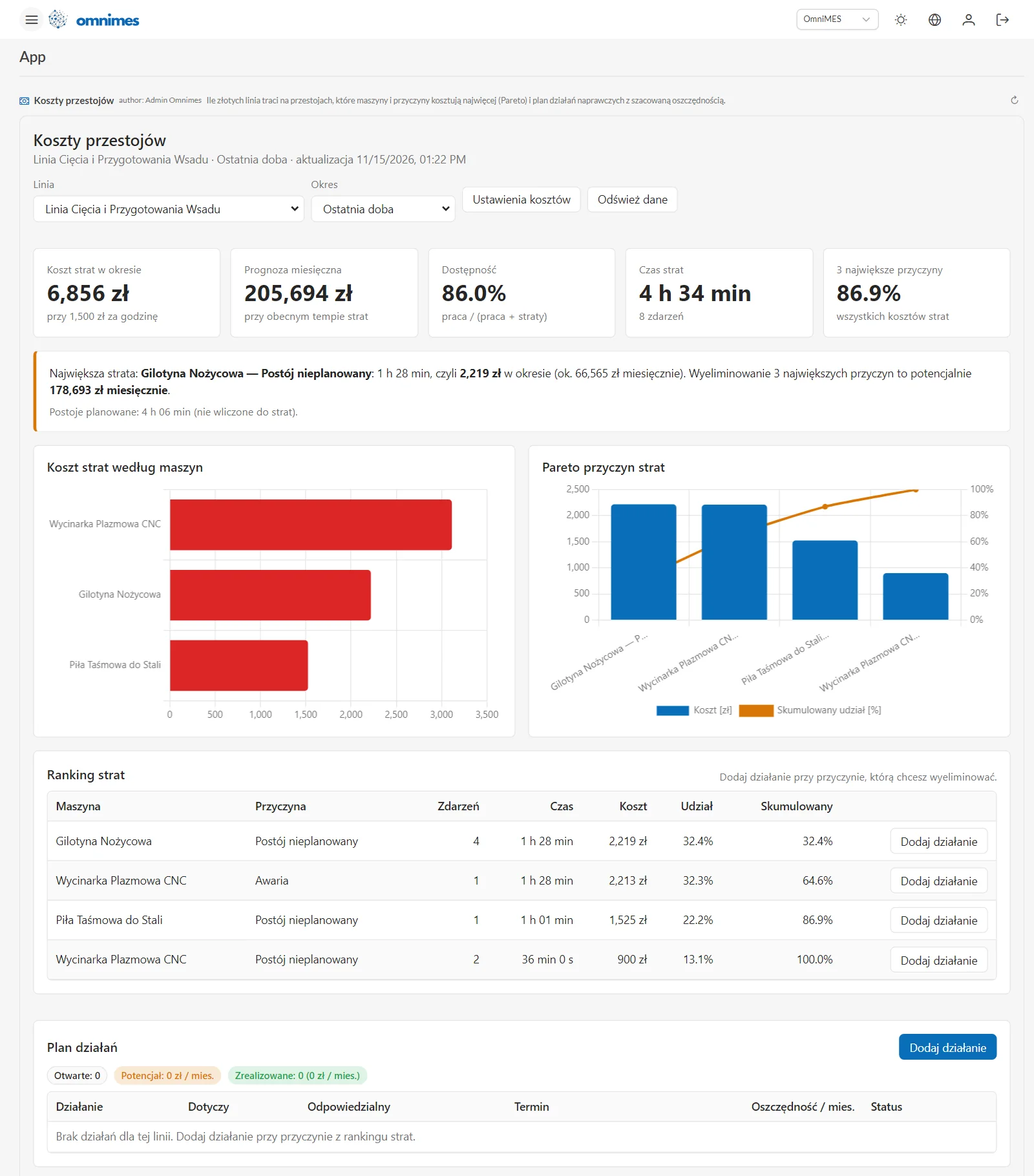
The question: how much is the line losing to downtime, and where should we start?
The app converts downtime into money at a rate the plant sets itself in the cost settings dialog. In the test we used PLN 1,500 per hour. For the cutting and batch preparation line over the last 24 hours, the app showed:
- PLN 6,856 in losses and 4 h 34 min of lost time across 8 events,
- 86.0% availability, calculated as run time divided by run time plus losses,
- a PLN 205,694 monthly forecast at the current rate of losses,
- 86.9% of all losses coming from the three largest causes.
Above the charts the app states its conclusion in plain words: the largest loss is an unplanned stop of the shear, 1 h 28 min, or PLN 2,219 in the period and about PLN 66,600 a month. Removing the three largest causes is worth up to PLN 178,693 a month. Planned stops (4 h 06 min here) are shown separately and are not counted as losses.
Further down there is a cost-by-machine chart, a Pareto chart of causes and a ranking of losses. Each cause has an add action button. The action goes into a plan with an owner, a due date, the estimated monthly saving and a status, and the counters above the plan show open actions, the potential and the savings already achieved.
The decision it supports: where to send maintenance first, and what that is worth. Minutes of downtime expressed in money are easier to defend in a management meeting than an availability percentage. The action plan stays in the app, so a week later everyone can see what was done and what it delivered.
Example 2: Order fulfilment
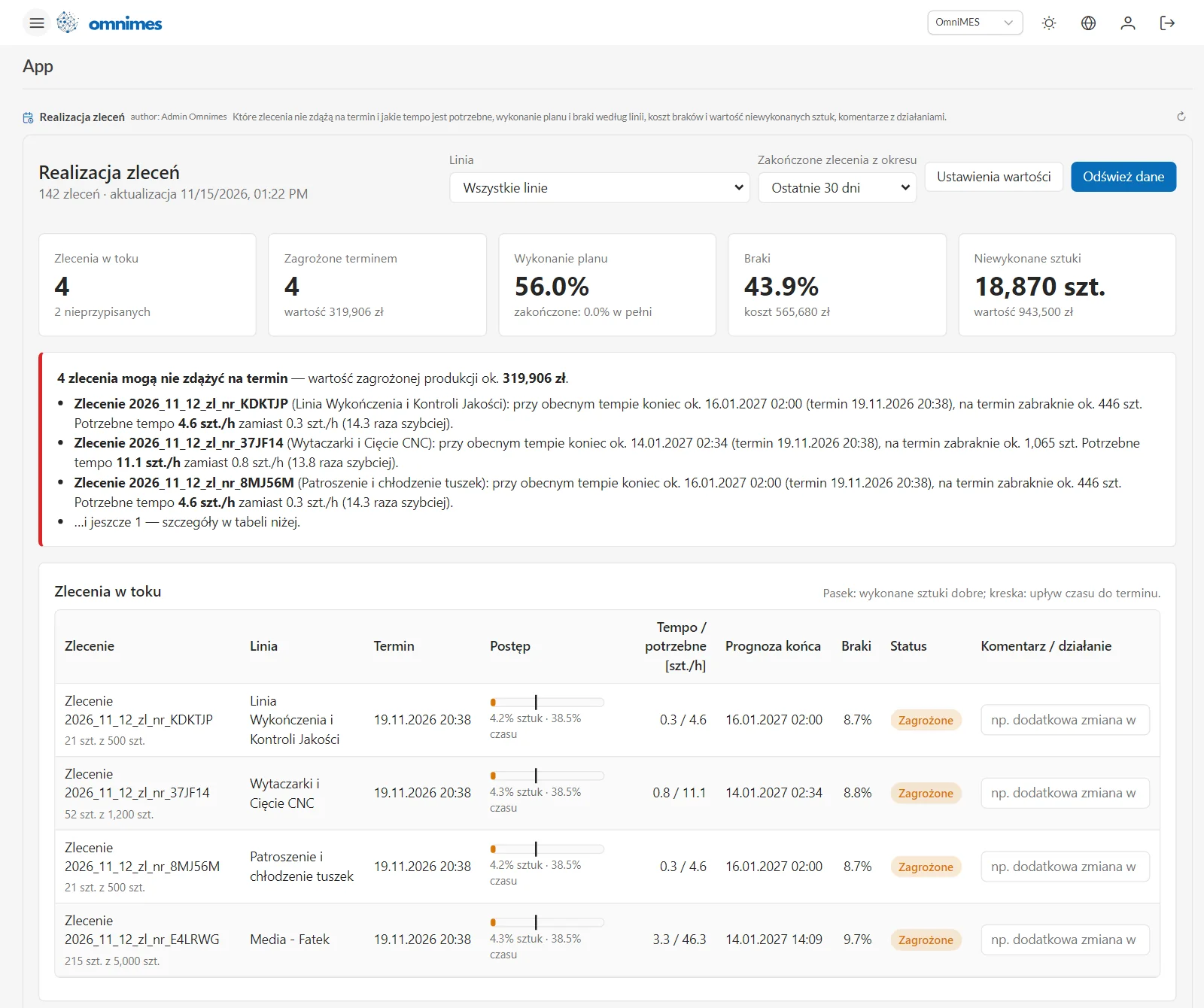
The question: which orders will miss their deadline, and what would it take to hit it?
The app takes the rate at which each order has been produced so far and works out a forecast completion date and the rate needed to meet the deadline. On the demo data, 4 of 142 orders were in progress and all four were at risk, with about PLN 320,000 worth of production in danger.
One example from the screen: an order on the finishing and quality-control line has 21 of 500 pieces done and is due on 19 November. At the current rate it will not finish until around 16 January 2027, and it will be about 445 pieces short on the due date. The app says it bluntly: the required rate is 4.6 pcs/h instead of 0.3 pcs/h, 14.3 times faster. Another order needs 11.1 pcs/h instead of 0.8 pcs/h.
For every order in progress the table shows a progress bar (good pieces against the time elapsed until the deadline), the current and required rate, the forecast completion, scrap and status. The last column is a comment field, for example "extra shift on Saturday". The comment is stored in the app and everyone using the app sees it. Above the table there are tiles for plan completion, scrap and its cost, and the number and value of unmade pieces. The value per piece and the cost of scrap are set in the value settings dialog. Below the table there are charts of plan completion and scrap by line, scrap week by week, and a list of completed orders with the largest loss.
The decision it supports: the morning production meeting. Instead of "we are behind", the team sees that an order needs a rate 14 times higher. One hour of overtime will not fix that, so the team has to decide: add a shift, move the order to another line, or talk to the customer about the date. The decision goes into the comment, and the next shift can see it.
This app already has two versions. The second came after the first test on real data: it added how many times faster production needs to run and a note about the remaining at-risk orders. That is the typical rhythm in App Studio: a first version, a check against real data, and a fix saved as the next version.
A third example, a shift handover board built in English, is in the works.
MCP Apps in plain words
We covered MCP (Model Context Protocol) itself in MCP in OmniMES in practice. In short, it is an open protocol that lets AI assistants use the tools of other systems.
MCP Apps is the first official extension to MCP, announced on 26 January 2026 (MCP, 2026). It lets an MCP server return not just text but an interactive interface: a form, a chart or a table. The interface is displayed by the host application, such as Claude, ChatGPT, Goose or Visual Studio Code. The standard also sets out security rules: the interface runs in a sandboxed browser frame, it talks to the host only through messages that can be logged, and the host can require the user's approval for tool calls started from the interface.
OmniMES uses the standard on both sides. As a host, it shows apps in its own menu. As an MCP server, it makes the same apps available in Claude Desktop. For a plant this means two things. An app is not locked into our proprietary format. And the isolation rules come from an open specification you can check for yourself, not just from our word.
Security and governance: freedom for the plant, control for IT
A language model writes the app, and people with different permissions run it. That is why the limits are enforced in OmniMES code, not in instructions to Claude:
- Viewer's permissions, never more than the author's. An app runs under the account of the person who opened it, but it can only do what both that person's and the author's permissions allow. A process engineer who shares an app with the plant director cannot use it to read anything they could not see themselves.
- Isolation. The app runs in a sandboxed frame. It has no access to login tokens, cookies or the internet. Its only route to data is through calls that the OmniMES server checks.
- A person confirms every write. Writing to OmniMES data requires the approval of the person using the app. The confirmation dialog is drawn by OmniMES, not by the app, and shows which app, by which author, wants to write what and where. In Claude Desktop, writes to OmniMES are disabled and only reading works. Comments and action plans live in the app's own separate data store.
- Admin apps only through a superuser. Writing to administrative areas such as users, permissions or settings is only possible in an app approved by a superuser.
- Audit log. The Audit log tab records changes to apps, menus and sharing, personal tokens, every data write from an app and every denied request. Data reads are not logged.
- Who can build. By default only the Administrators group can open App Studio. Other groups get access in the Access screen, like any other screen. Only a superuser can set the Claude API key.
Apps, their versions and their data are stored in the OmniMES database. There are no extra servers or services to run, and a system backup covers them along with everything else.
An app or a BI dashboard?
OmniMES has BI dashboards in Redash, and they are still worth using. The difference is simple: a BI dashboard shows numbers, while an app adds logic, decisions and actions on top of them.
| BI dashboard (Redash) | App Studio app | |
|---|---|---|
| Best for | trends, comparisons and reports for a wide audience | one specific decision made on a regular basis |
| Who builds it | an analyst who knows SQL, or an AI assistant via MCP | the person who knows the problem, in a conversation with Claude |
| What it contains | charts and tables from queries | KPIs, charts and tables plus calculations such as the required rate or the cost of a cause at the plant's own rate |
| Actions | none, read-only | comments, action plans, settings, writes to OmniMES after confirmation |
| Where it runs | Redash, a link, an embed on a page | the OmniMES menu, Claude Desktop |
| Governance | Redash permissions | OmniMES permissions, versions, audit log |
A simple rule of thumb: if the answer is a number or a trend that many people look at, a dashboard is enough. If the answer leads to a decision and someone needs to record what was done about it, an app is the better fit. The two work well together: the app is the team's working screen, and the dashboard is the report for management.
Limitations, and what Beta means
- This is a Beta. We will keep testing App Studio, and screens and behaviour may still change. Feedback from users shapes the next versions.
- An app is only as good as its description and its data. Claude builds the app, but the plant decides the assumptions behind the calculations, such as the cost of an hour of downtime or the value of a piece. Before an app starts supporting decisions, compare its results with the standard OmniMES screens, such as Work time or OEE.
- Forecasts are simple. The monthly forecast and the order completion forecast are based on the current rate. They are a quick estimate, not a predictive model.
- An app cannot show what you do not measure. Without signals, statuses and orders in OmniMES there is nothing to calculate from.
- Costs. The builder chat uses API tokens billed in the Claude Console. Building and refining an app usually takes a handful of messages.
- It does not replace product development. If many plants need the same app, that is a sign the feature belongs in OmniMES itself.
How to get started
- Pick one question that costs time or money every week, ideally one that comes up in the morning meeting.
- Give App Studio access to the group that will build apps, in the Access screen.
- Choose how to work with Claude: an API key entered by a superuser in the Claude connection tab, or the OmniMES extension for Claude Desktop with a personal token.
- Describe the app the way you would explain it to a colleague: which data, who will use it, which decision it supports and what should be recorded.
- Check the numbers in the preview and refine the app with follow-up messages.
- Add the app to a menu section, share it with a group, and review the Audit log after a week.
App Studio is available from version 4.9.0. The full list of changes is in the changelog. For more on how an AI assistant works with OmniMES over MCP, and why a person approves the changes, see MCP has reached the PLC. If you would like to see App Studio on your own data, get in touch.
Sources
- Model Context Protocol, MCP Apps - Bringing UI Capabilities To MCP Clients, 26 January 2026 — https://blog.modelcontextprotocol.io/posts/2026-01-26-mcp-apps/
- Model Context Protocol, MCP Apps specification and SDK repository — https://github.com/modelcontextprotocol/ext-apps
- Anthropic, API credits for Max, Ultra, and Team plans — https://platform.claude.com/docs/en/about-claude/api-credits-for-subscribers
- OmniMES, changelog, version 4.9.0 — https://www.omnimes.com/en/changelog